Fio Banka new Online banking UX/UI
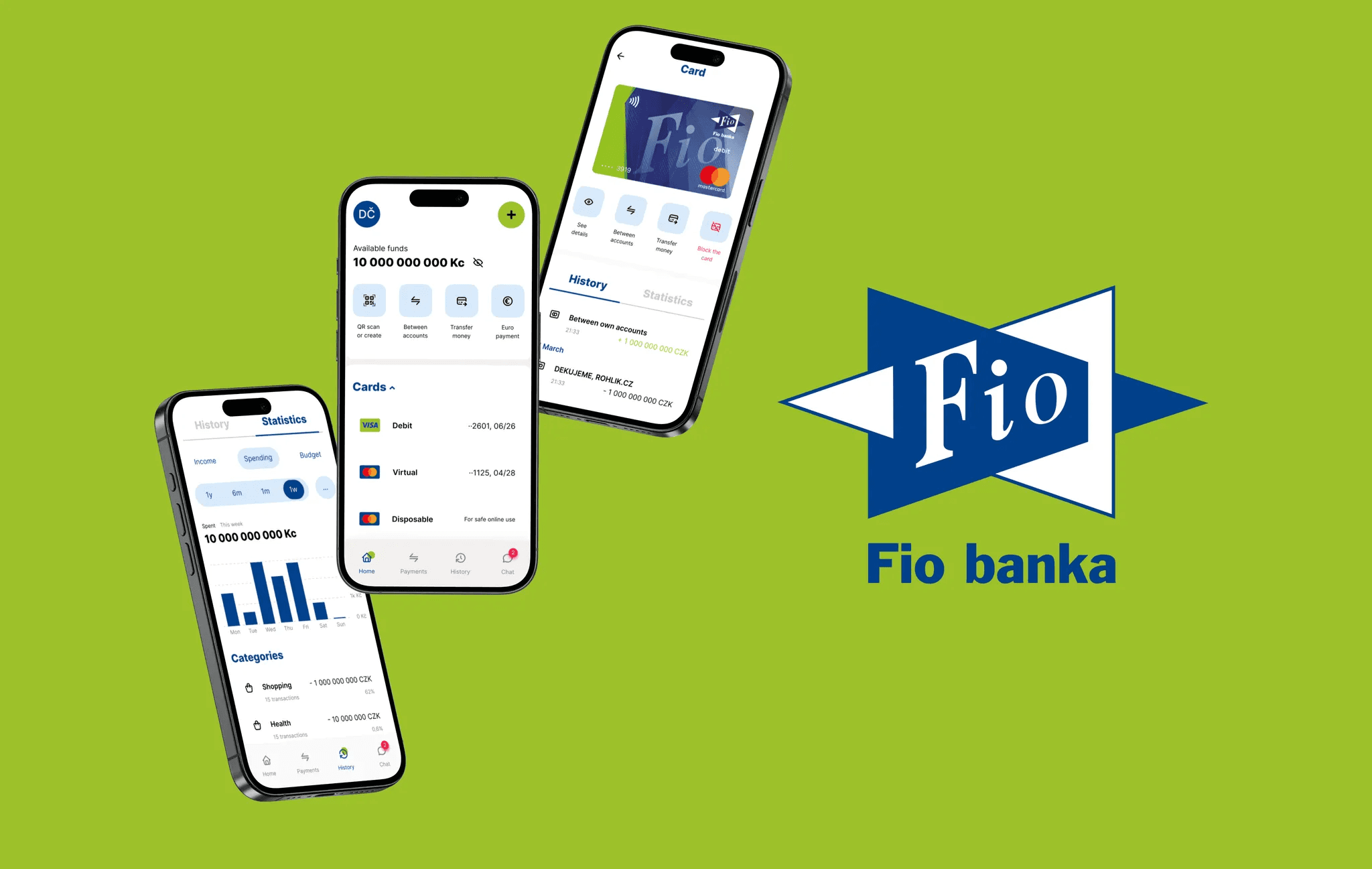
Fio Banka, a prominent player in the Czech banking market, has experienced significant growth, reaching nearly 1.4 million clients as of February 2024. To meet the evolving needs of this growing user base, Fio Banka is committed to continually enhancing its digital services.
Project Background
Project Details
To create a truly user-centric online banking experience for Fio's growing customer base. This project aims to enhance usability and simplify everyday financial tasks. The main goal was to modernize the interface while prioritizing accessibility for all users.
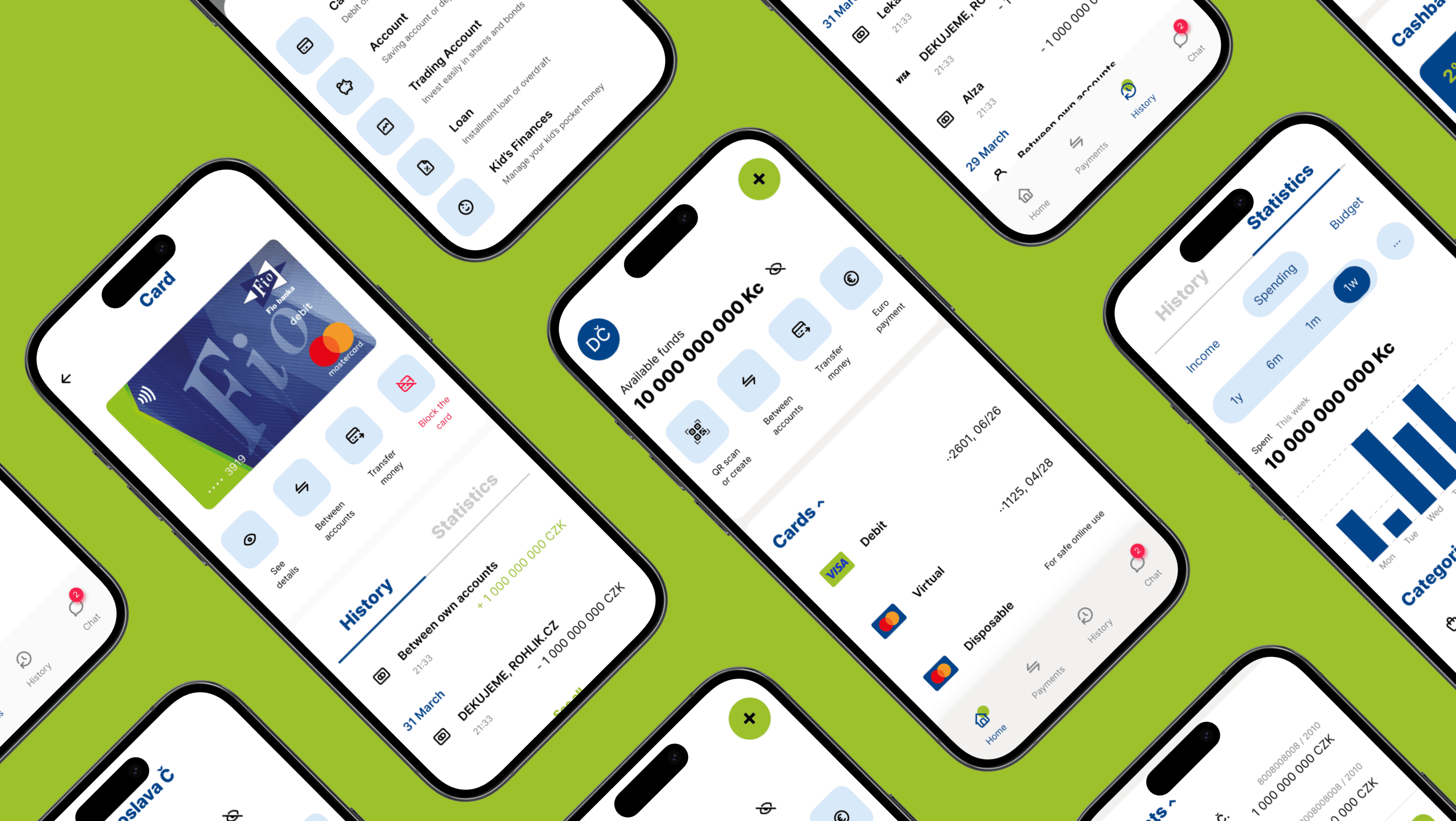
My Roles & Responsibilities
As the sole product designer for this project, I took charge of:
Understanding user needs and behaviors: Conducted in-depth user interviews to gather insights into user expectations and pain points.
Conducting benchmarking research: Researched industry standards and competitor solutions to identify best practices and industry trends.
Defining the user journey: Developed screenflow and wireframes to visualize the user experience and guide design decisions.
Collaborating with developers: Collaborated with developers through tech review to assess the feasibility of design solutions.
Crafting the visual experience: Created initial UI designs, incorporating user research and developer’s feedback.
Testing and iterating: Facilitated UX tests on the Figma prototype, gathering feedback from users and iterating on the designs to improve usability and address identified issues.
Finalizing the design: Delivered polished UI designs for the banking app, incorporating user feedback and aligning with development requirements.
Navigation
In-depth interview
The primary goal of the in-depth interviews was to uncover the user's journey with online banking. This included understanding how users currently interact with banking apps, identifying their likes and dislikes, and uncovering their motivations for choosing specific products. This information was crucial for designing the user flow and prioritizing features in Fio Banka's new online banking experience. As our target audience we chose individuals who actively use online banking services in the Czech Republic.

Interview results
A total of 12 interviews were conducted. Key insights from these interviews include:
Fio Banka Usage: Six participants had experience with Fio Banka's online banking, but none identified it as their favorite or as a user-friendly app.
Mobile-First Focus: Ten participants exclusively use mobile phones for online banking, highlighting the importance of prioritizing mobile design (mobile-first approach).
Customer Acquisition: Eight out of twelve participants chose their bank based on recommendations from friends, suggesting a potential opportunity for a referral program.
User Preferences:
- Top features in competitor apps included clear statistics (6 mentions) and easy transfers between own accounts (6 mentions).
- All participants emphasized the importance of user-friendly interfaces, which none of the Fio Banka users found in the current app.
Pain points included:
- Complicated information architecture and terminology
- Difficulty finding specific functions
- Overly simple UI with poor product differentiation
- Lack of notification control
- Safety concerns
- Limited mobile app functionality compared to the web version
- Quick logout problem
Usage Patterns:
- Eight participants most frequently use banking apps to check their balances.
- Ten participants mostly use the app for money transfers.
- Eight participants regularly use QR code scanning and generation.
- Six participants use the app for online shopping (payment confirmation).
- Six participants use the app to send money abroad.
These findings offer valuable insights into user expectations and pain points, informing the design direction of Fio Banka's new online banking experience. The redesign will prioritize simplifying the interface, enhancing navigation, and improving feature discoverability.
Benchmarking
Competitive Analysis
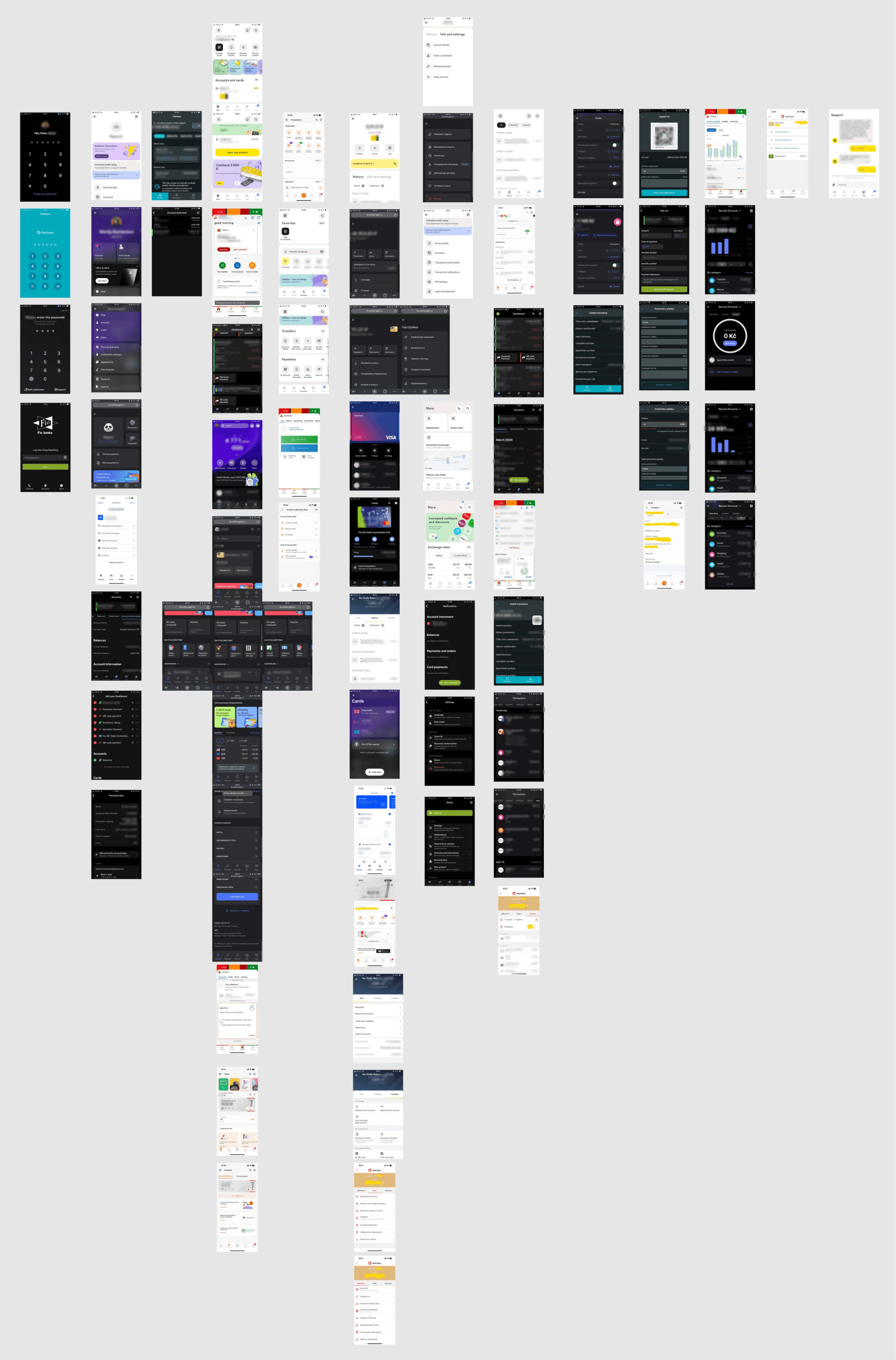
To gain a deeper understanding of the competitive landscape and best practices in online banking, I conducted a thorough benchmarking analysis. This involved examining direct and indirect competitors, as well as financial institutions known for their digital experiences.
The research focused on several key areas:
User Interface (UI) and User Experience (UX): I analyzed the visual design, navigation, information architecture, screenflows, and overall usability of each platform.
Features and Functionality: I explored the range of features offered by each platform, paying attention to core banking functions as well as features mentioned by users in the interview.
Key findings
Clean and Professional Aesthetics: Competitors generally opt for minimalist color schemes and limit graphic elements, prioritizing a professional look and feel.
Main Page as Product Overview: The main dashboard serves as an overview of all customer products and accounts.
Prominent Balance Display: Most competitors prominently feature the total available funds at the top of their main dashboard.
Minimalist Login Screens: Sign-in screens typically avoid displaying logos, with some exceptions for simple, one-color vector logos.
This benchmarking analysis helped identify both industry standards and areas where Fio Banka could differentiate itself in the market. The findings served as a valuable foundation for the design decisions made throughout the project.
Screenflow + Wireframes
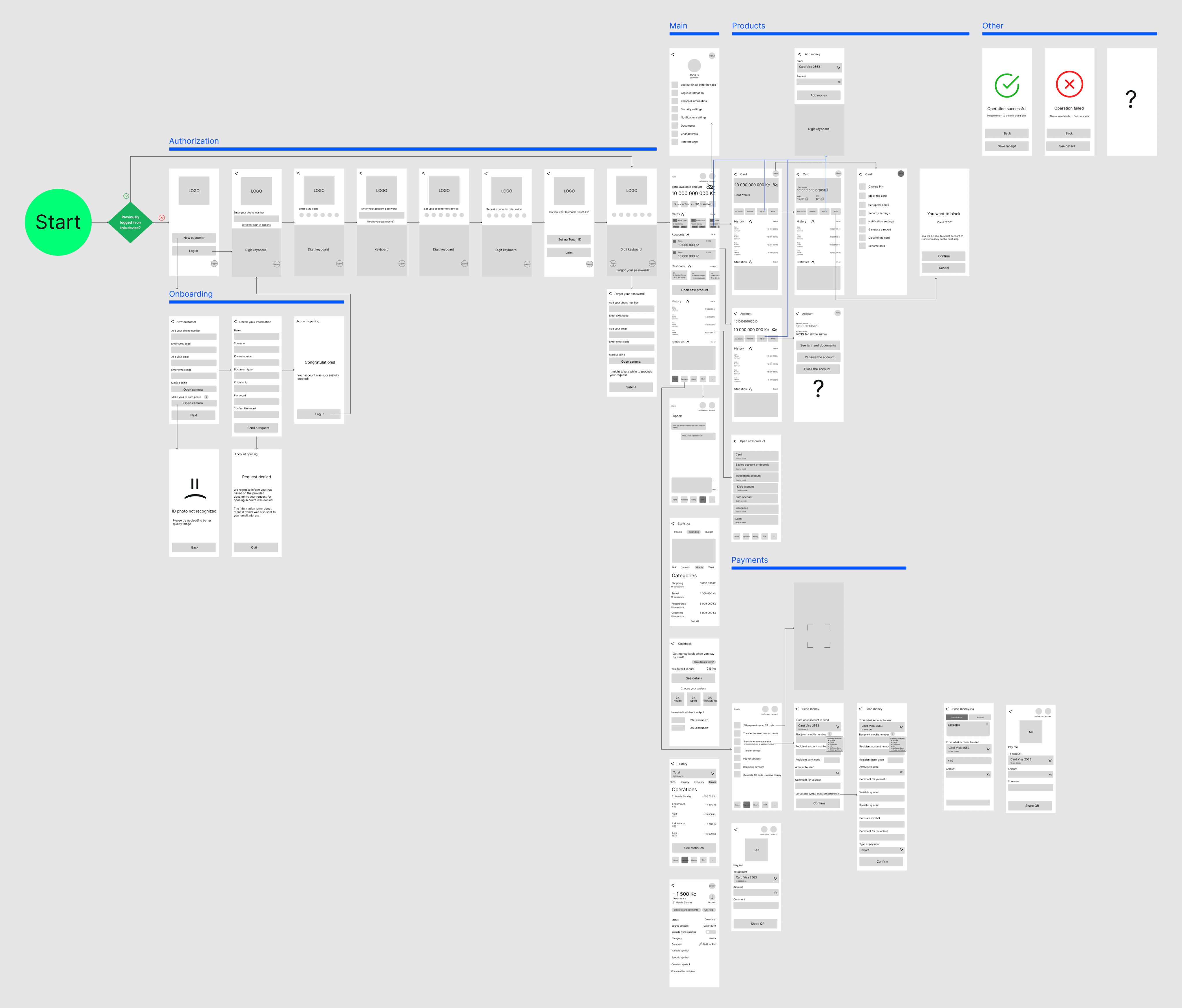
This phase of the project focused on visualizing and refining the user journey through the online banking app. I began by developing a user flow, outlining the key touchpoints users would encounter while interacting with the app. This user flow then informed the design of screenflows and wireframes, although the process was iterative as new insights emerged.
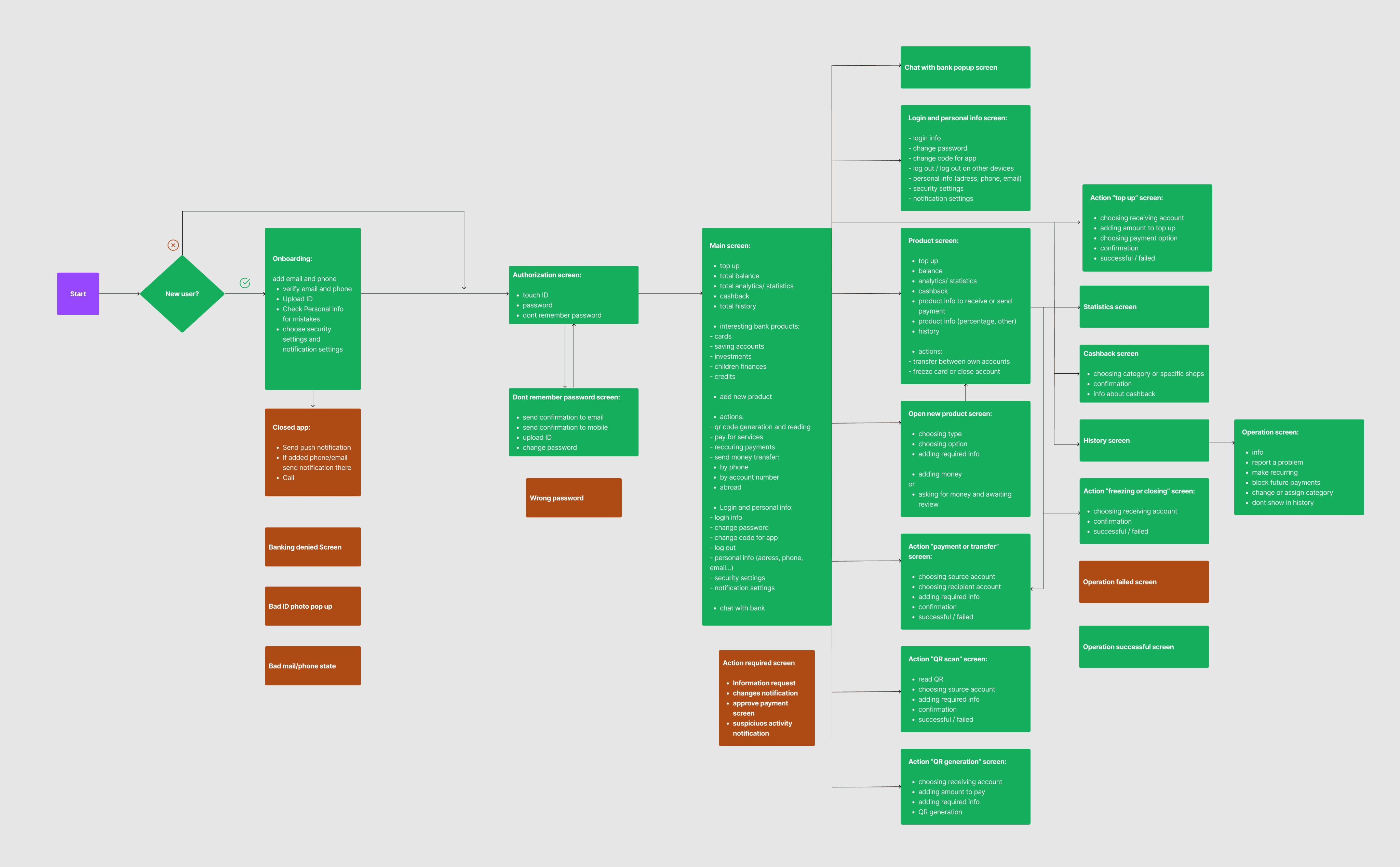
Here's how the initial user flow evolved during the wireframing stage:
Enhanced Authorization Screenflow: Upon the first launch, the new welcome screen now guides new customers through account opening, while existing customers use a secure two-step authentication with selfie verification.
Consolidated Payments: To simplify navigation and reduce user confusion, the "Transfers" and "Payments" sections were merged into one top-level screen called "Payments."
Focused Transfer Options: The transfer screen was divided into two screens for international and domestic payments, streamlining each process.
Combined QR Codes: QR code generation and scanning were consolidated into a single page for ease of access and clarity.
The refined wireframes were then integrated into screenflows, creating a comprehensive visualization of the user journey from start to finish. This approach ensured that any potential gaps or inconsistencies in the user experience were identified and addressed. Screenflows also effectively communicated the app's logic to stakeholders.
Technical Review
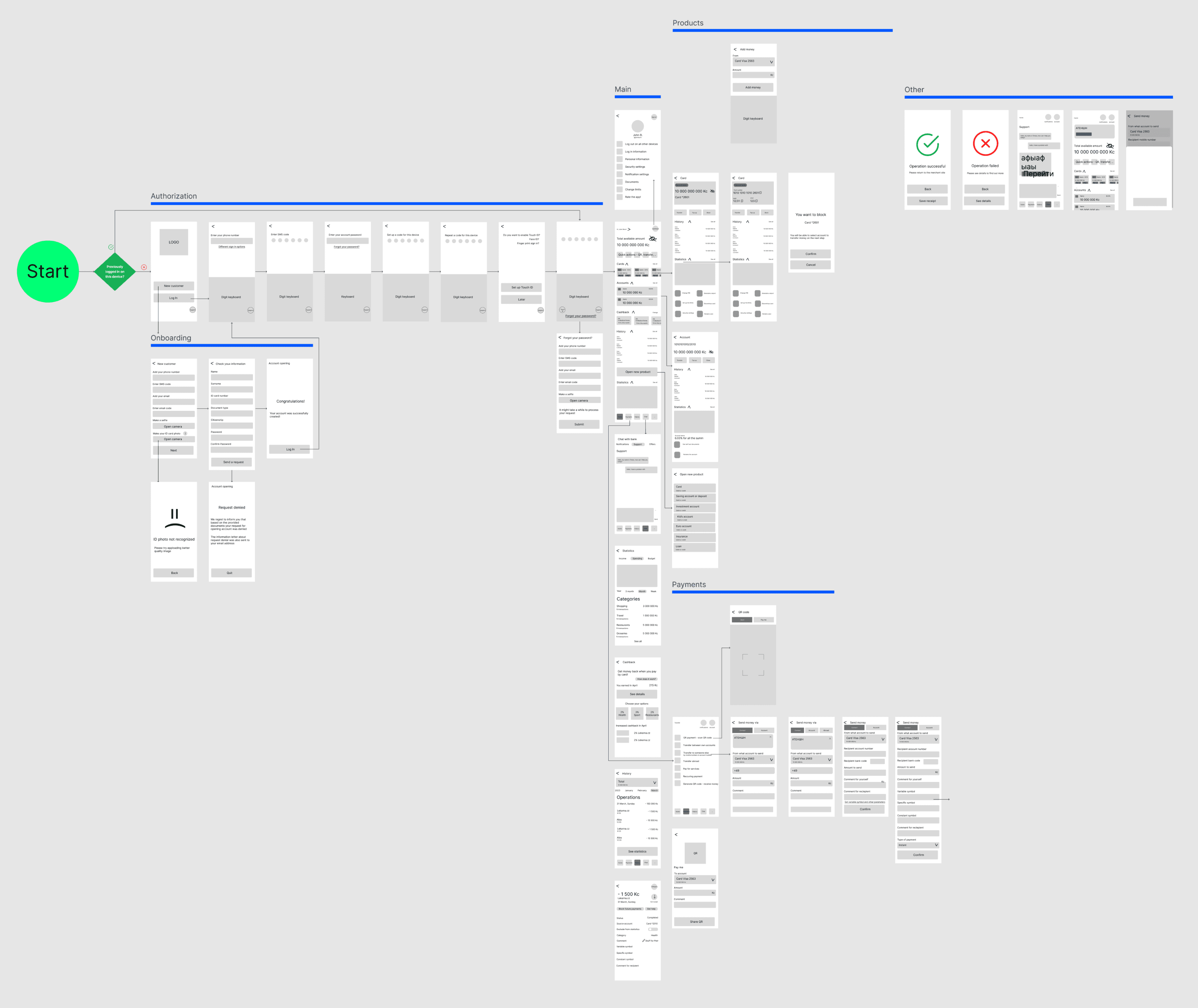
During the technical review phase, I worked with developers to refine the UI design, ensuring it met both user experience goals and development feasibility. This process resulted in several key improvements:
Prioritized Business Logic: Main page blocks were reordered to better reflect business priorities while maintaining a user-friendly experience.
Optimized Sales Funnel: We removed first-level links on second-level pages to prevent users from dropping out of the sales funnel prematurely.
Streamlined Navigation: Eliminated unnecessary screens by consolidating information onto fewer pages, minimizing clicks, and improving efficiency for users.
Streamlined Account Access: To enhance user convenience, account access was moved directly to the main screen, eliminating the need for unnecessary navigation.
Streamlined Product Display: We unified the presentation of various products on the main page. This reduced visual clutter and streamlined the overall interface, creating a clear and consistent product overview.
Modernized Authentication: Simplified the authorization flow, making it more user-friendly and aligning with current best practices
Centralized Communication: Integrated notifications with the chat feature, creating a single, two-way communication channel for users.
Centralized Notifications: A dedicated notification center page was created, giving users clear control over paid and unpaid notification options in one place.
Clearer Money Transfers: Split the transfer process into separate tabs for account number and mobile number transfers, reducing confusion and improving the user journey.
Dynamic UI Enhancements: Incorporated interactive states and pop-ups, replacing some full-screen views with pop-ups for a more responsive and engaging experience.
First Iteration UI Design
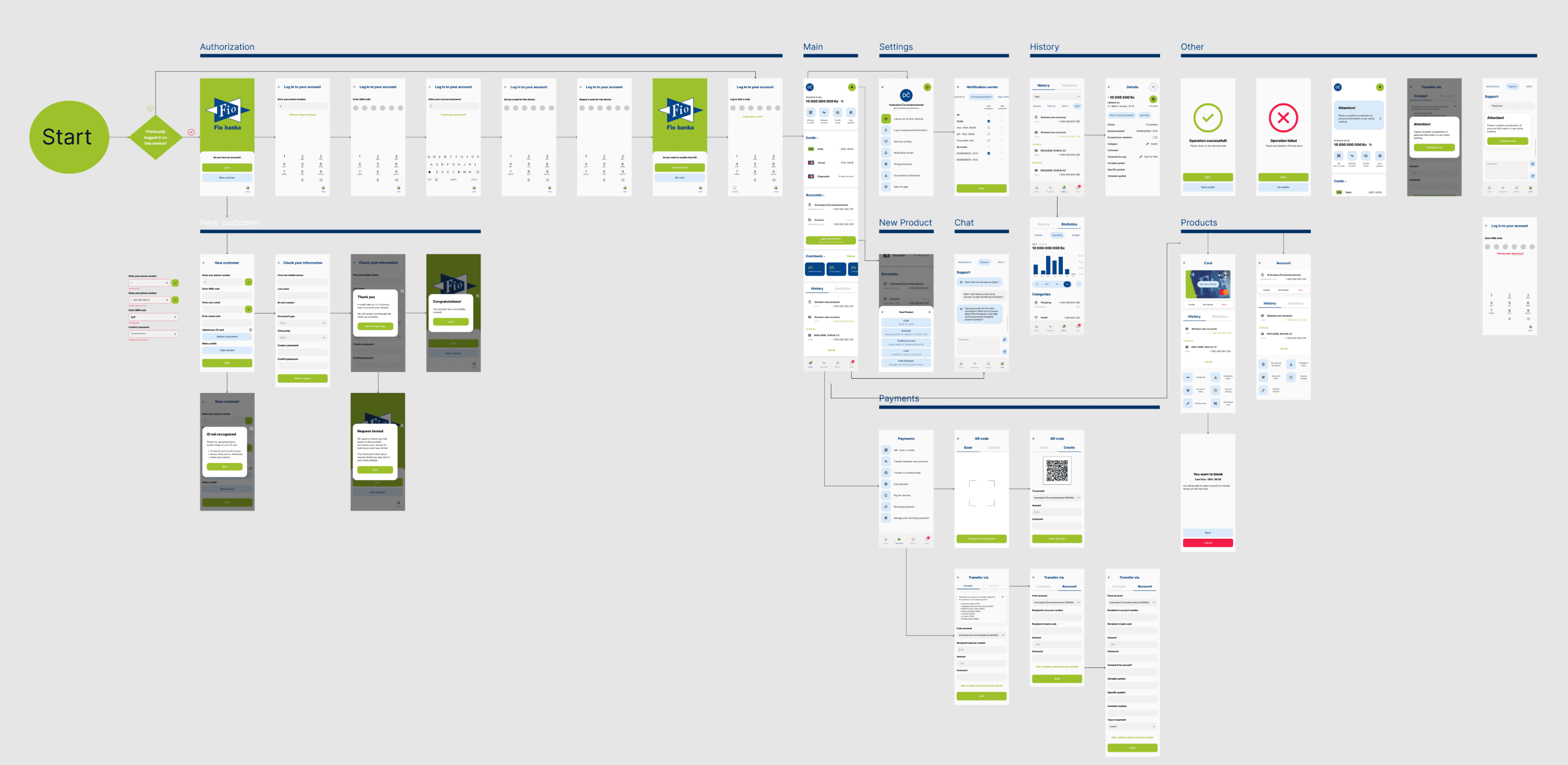
Incorporating feedback from the technical review and insights gathered during user interviews, I developed the initial UI design. The design focused on creating a clear, professional, and intuitive user experience while maintaining Fio Banka's existing brand identity. I expanded the bank's color scheme, aiming for a visually cohesive and recognizable experience.
User Testing
Usability testing of the prototype of a new mobile application
Usability testing was conducted remotely using the respondent's own mobile device to evaluate the app's interface. A total of 7 sessions were completed, each lasting approximately 15 minutes.

Testing process
Scenario 1:
Starting on the first screen. Imagine, you want to see your Visa card number. What will you do?
Hypotheses:
The user will understand that by clicking one of the products, they will open product card
The user will understand that by clicking “see details” button, they will reveal the card info
Scenario 2:
Starting on the main page. Imagine, you want to see your total statistics for the year 2012. What will you do?
Hypotheses:
The user will understand that they need to enter the history and switch the tab to access statistics
The user will understand that they can control the interval size by clicking “1y”
The user will understand that they need to push the “…” button to set a specific time interval
Scenario 3:
Starting on the main page. Imagine, you want to log out from the app. What will you do?
Hypotheses:
The user will understand that they need to enter the account screen to log out
The user will understand where the green logout button is on the account screen
Test results
Scenario 1:
User 7 (Senior): Showed initial confusion about how to open product cards, and tried closing cards accordion component.
User 2: Struggled to notice the "See details" button, trying to click on the card image to access product details. This suggests opening details by clicking on card might be a feature to consider.
Scenario 2:
Initial Difficulty: The first three users failed to notice the period length switch, revealing a significant usability issue.
Design Iteration: To address this, the switch was moved to the top of the page, resulting in a 75% success rate among the remaining participants, including the senior user.
Additional Finding: Two users expressed confusion about the "..." button.
6/7
User 1
User 2
User 3
User 4
User 5
User 6
User 7
Scenario 1
H1
H2
Scenario 2
H1
H2
H3
Scenario 3
H1
H2
6/7
6/7
7/7
3/7
5/7
6/7
Scenario 3:
User 1: Searched for the logout option on the main page.
User 7 (Senior): Accidentally clicked "Log out on all other devices" instead of the intended logout button
User testing revealed key findings across all three scenarios.
Initial placement of the period length switch posed a significant usability challenge, but relocating it to the top of the page resulted in a 75% success rate in the remaining tests.
Senior users require clearer visual cues, suggesting a potential accessibility mode for the app.
Opening details by clicking on card as well might be a feature to consider.
Visual/UI Design
The final UI design for the Fio Banka mobile banking app emerged as a refined and user-centric solution, incorporating insights from user testing and addressing pain points identified in the initial research. The goal was to strike a balance between professionalism and approachability. The color scheme was expanded from Fio Banka's existing branding, to create visual interest and hierarchy while retaining a sense of familiarity.
Throughout the design process, feedback was continually gathered from stakeholders, and incorporated into design iterations. This iterative approach ensured that the final UI design was not only visually appealing but also highly usable and aligned with the needs of Fio Banka's customers.
Main screen
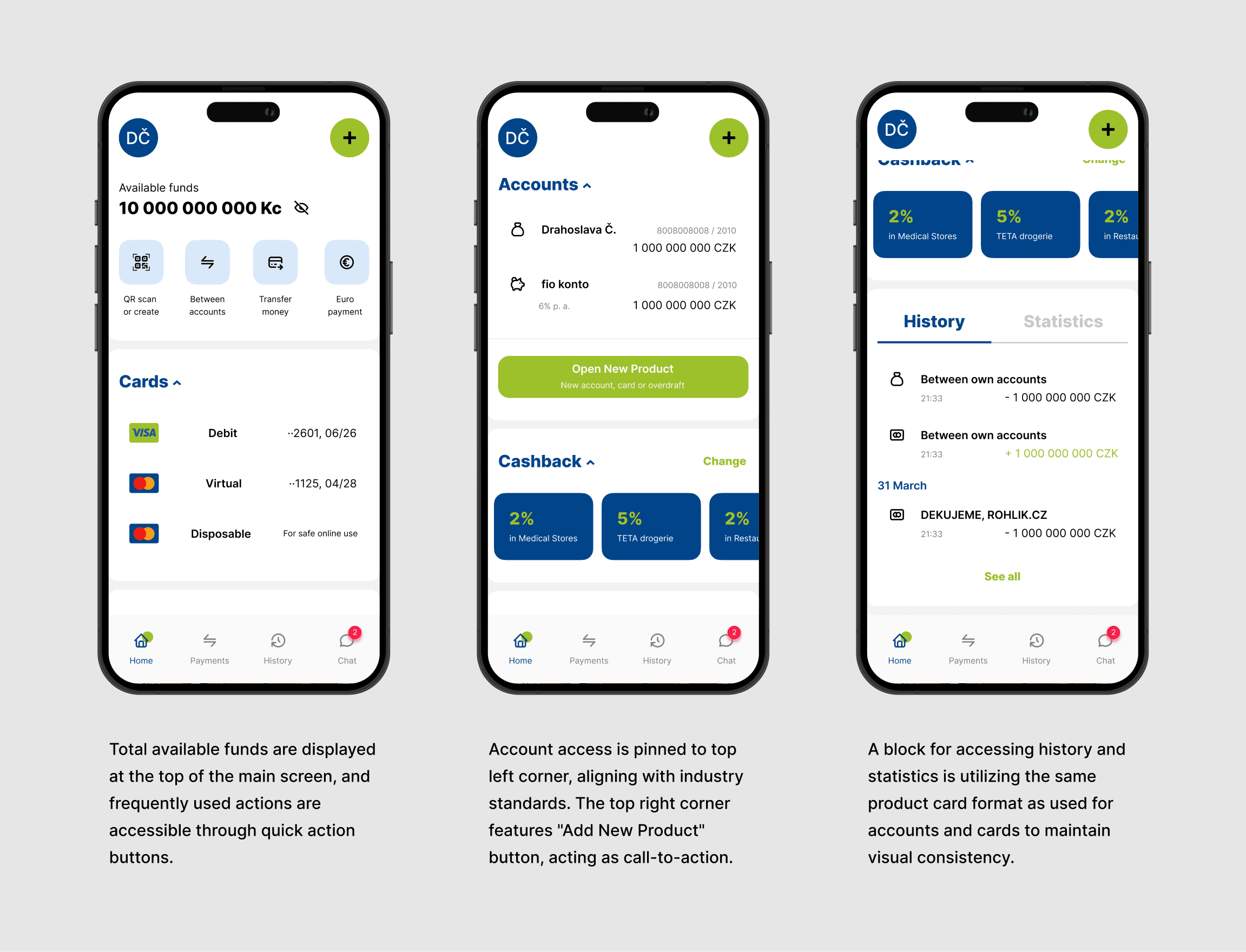
The design embraced a clean aesthetic with ample white space, ensuring a visually uncluttered experience for users. This approach enhances readability and allows for focused interaction with the app's features. The navigation structure was simplified and optimized for mobile devices. Key features were prominently placed and easily accessible, reducing the number of taps required to complete tasks. A consistent and visually appealing card system was implemented for product display. This allowed for efficient browsing and easy comparison of account information.
Everyday banking scenarios
Payments
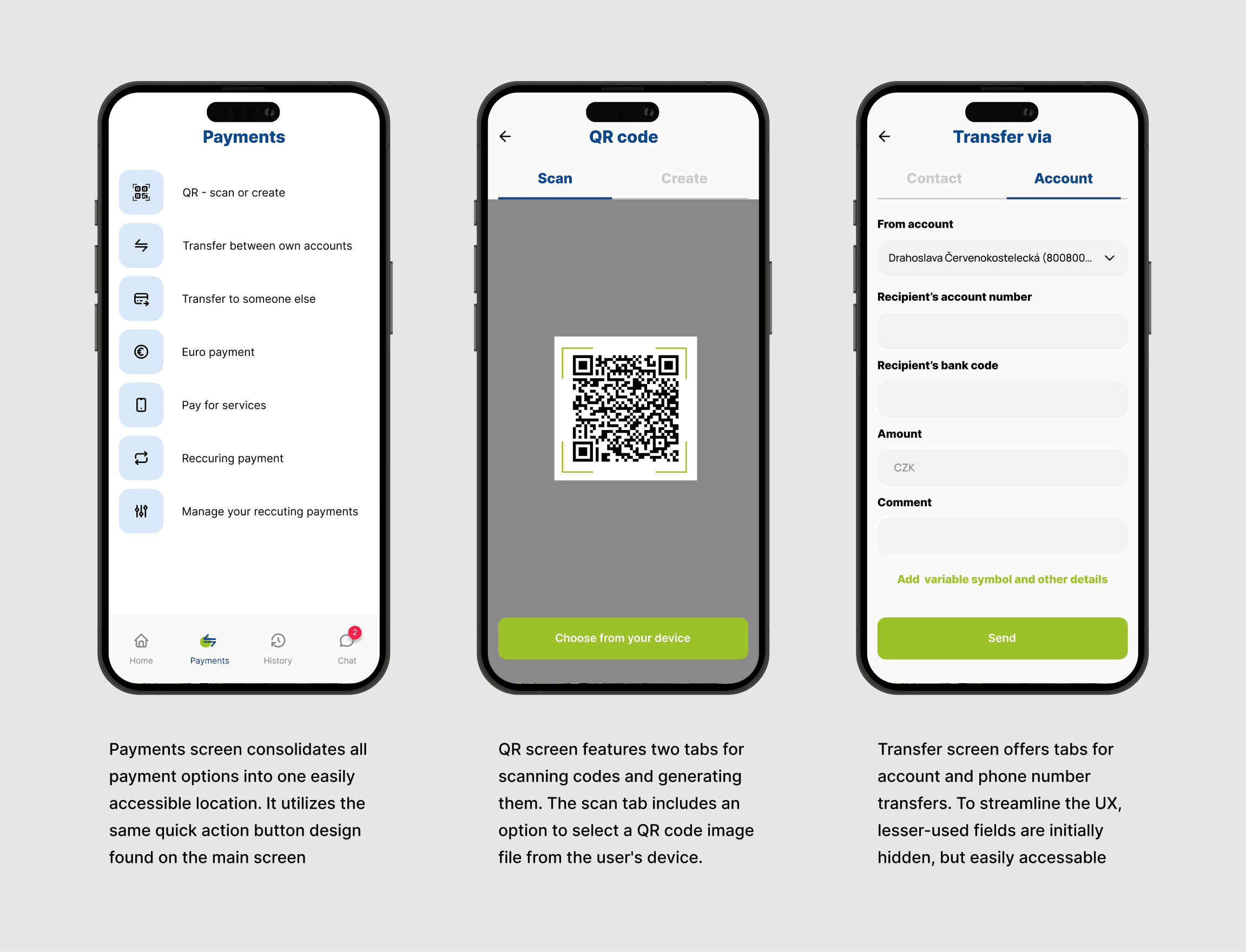
During the design process, the payments screenflow underwent multiple iterations to optimize the user experience. Initially, transfers and payments were separate screens, leading to user confusion about which option to choose for their needs. To address this, I merged these into a single "Payments" screen with clear tabs for different types of transactions.
For transfers, I initially designed a single screen with all input fields. However, developers suggested that this approach might cause confusion. To improve clarity, I split the transfer process into two tabs, one for transfers via account number and another via phone number.
An important consideration for developers is ensuring smooth data transfer between pages in case of user errors. If a user completes the first page and then navigates to the full form, any entered data should be retained and automatically populated in the corresponding fields
History and statistics
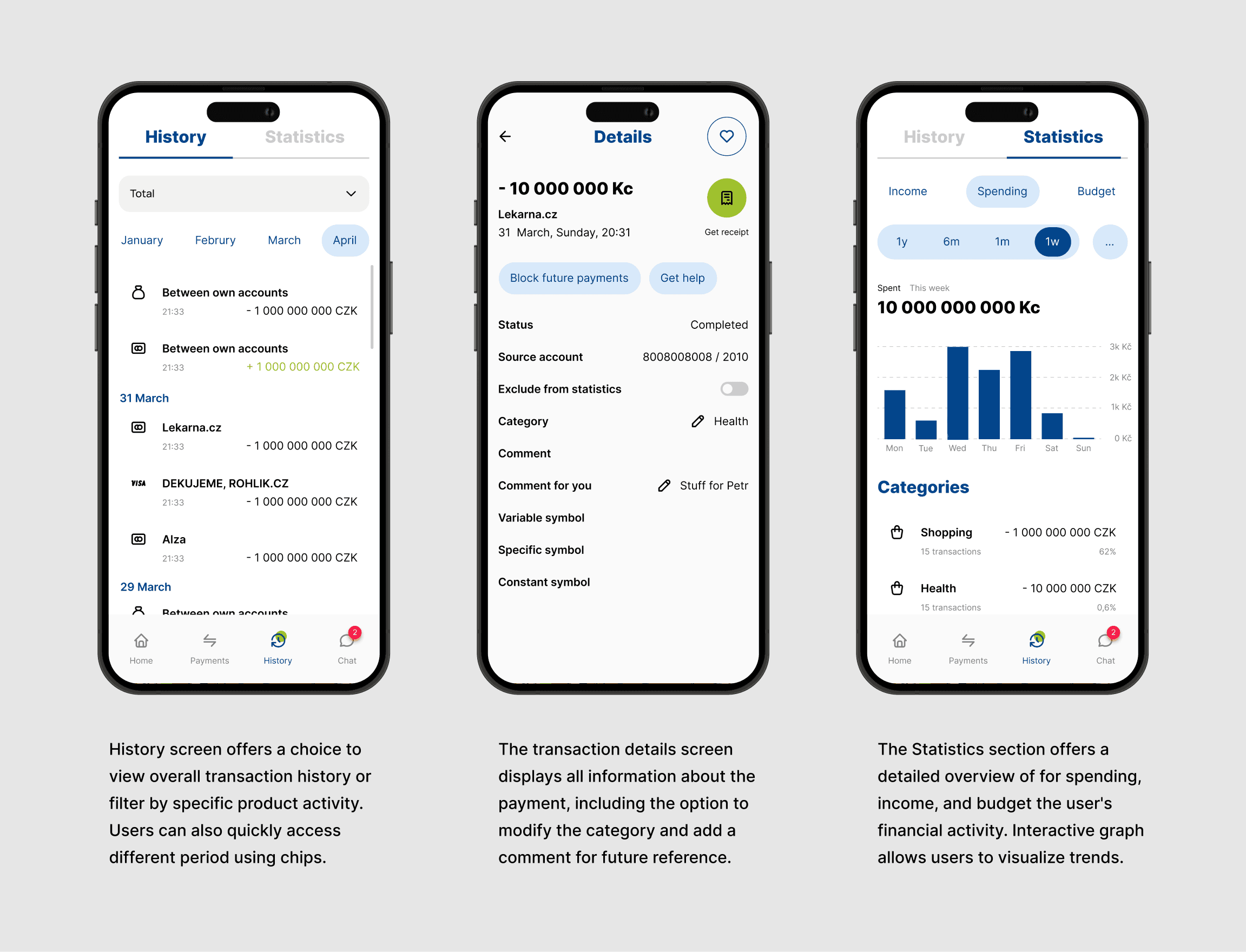
The History and Statistics screenflow underwent a transformation to prioritize user clarity and understanding. Initial user testing exposed an issue with the placement of the period length switch, as many users overlooked it in its original location. To address this, the switch was relocated to the top of the page. This design iteration proved highly successful, with subsequent tests demonstrating a 75% increase in user success rates.
The History and Statistics sections were designed to provide users with clear overview of their financial activity to understand and manage their finances effectively. It employs the same product card design used for accounts and cards, further enhancing usability.
Products
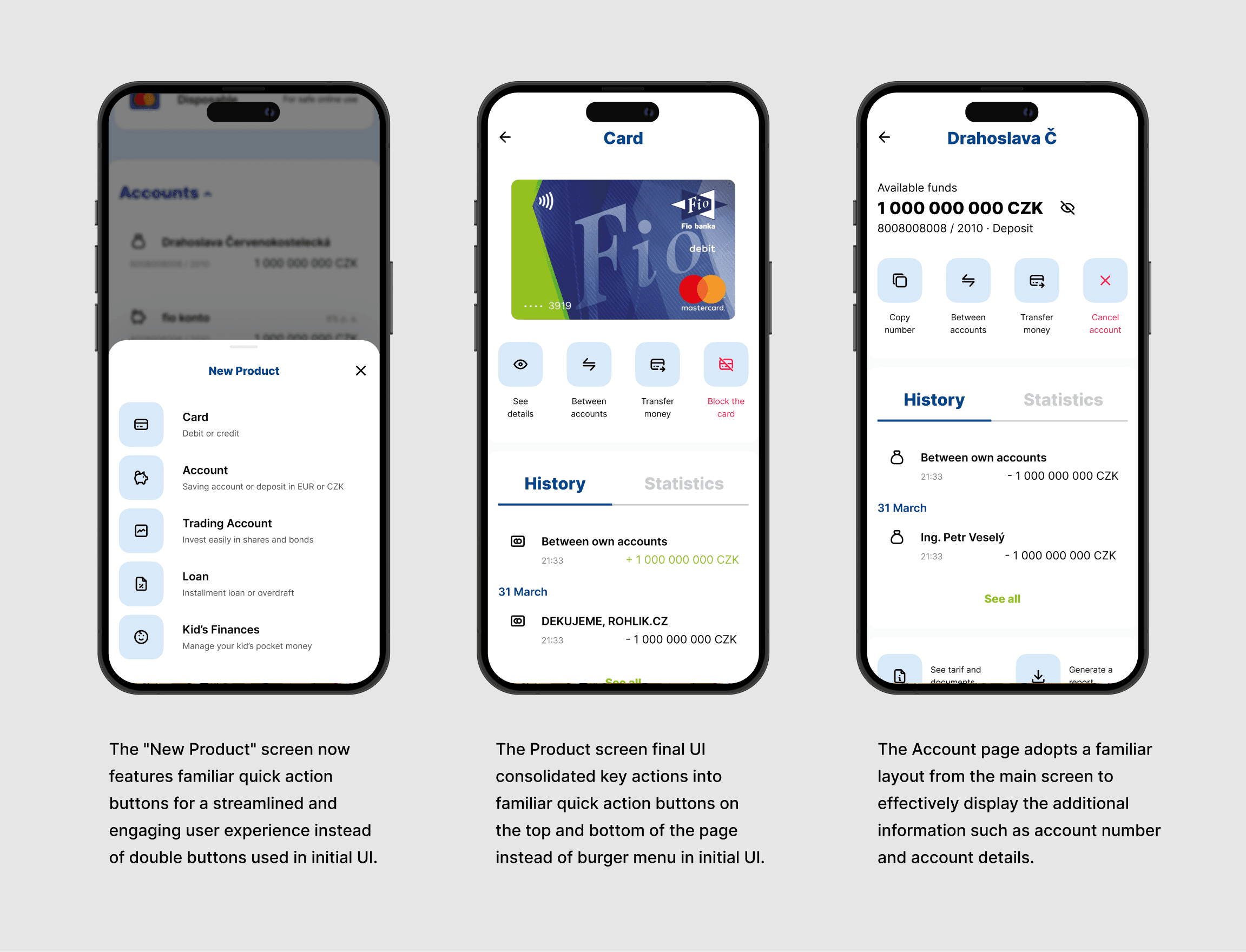
The "New Product" screen was changed between initial and the final UI. Double buttons were replaced with quick action buttons, mirroring the main screen's design. This minimized clutter, and made the screen more intuitive, clean and engaging for users.
The Product screen underwent a significant redesign for improved usability. The original burger menu used in wireframes was replaced with familiar quick action buttons, mirroring those on the main screen. This streamlined the interface and consolidated key actions at the top and bottom of the product page, enhancing user convenience, navigation, and potentially reducing the need for customer support calls.
Takeaways
The project's core research and design phases, involving in-depth user interviews, benchmarking, creation of the customer journey map, as well as iterative UI design refinements based on technical reviews and user testing feedback, have been successfully completed. The interactive prototype and design layouts for all screens, informed by user research and testing insights, are now ready for development.
Personally, this project provided invaluable experience in independently leading an in-depth user interview process from start to finish. From establishing research goals and formulating questions to conducting interviews, analyzing results, and translating those insights into actionable design decisions. I learned the importance of asking the right questions in the right way. This experience has significantly strengthened my research skills and will be a valuable asset in the future.